Search This Blog

Friday, September 16, 2016

CHAPTER FOURTEEN : CREATING COLLABORATIVE PARTNERSHIPS

TEAMS, PARTNERSHIPS AND ALLIANCES

Organizations create and use teams, partnerships and alliances to;

o   Undertake new initiatives
o   Address both minor and major problems
o   Capitalize on significant opportunities

Organizations create teams, partnerships and alliances both internally with employees and externally with other organizations

Collaboration system – supports the work of teams by facilitating the sharing and flow of information


Information partnerships with other organizations


Organizations from alliance and partnerships with other organizations based on their core competency

o   Core competency – An organization’s key strength, a business function that it does better than any of its competitors

o   Core competency strategy – Organization chooses to focus specifically on its core competency and forms partnerships with other organizations to handle nonstrategic business processes

Information technology can make a business partnership easier to establish and manage
o   Information partnerships – Occurs when two or more organizations cooperate by integrating their IT systems, thereby providing customers with the best of what each can offer

The internet has dramatically increased the ease and availability for IT – enabled organizational alliance and partnerships


COLLABORATION SYSTEMS

Collaboration solves specific business tasks such as telecommuting, online meetings, deploying applications, and remote project and sales management

Collaboration system – An IT- based set of tools that supports the work of teams by facilitating the sharing and flow of information.

Two categories of collaboration
1.       Unstructured collaboration (information collaboration) – includes document exchange, shared whiteboards, discussion forums, and email.
2.       Structured collaboration (process collaboration) – involves shared participation in business processes such as workflow in which knowledge is hard-coded as rules


COLLABORATIVE BUSINESS FUNCTIONS


Collaboration systems include;
Knowledge management systems
Content management systems
Workflow management systems
Groupware systems


KNOWLEDGE MANAGEMENT SYSTEMS

Knowledge management (KM) – involves capturing, classifying, evaluating, retrieving and sharing information assets in a way that provides context for effective decisions and actions
Knowledge management system – supports the capturing and use of an organization’s “know-how”

EXPLICIT AND TACIT KNOWLEDGE

Intellectual and knowledge-based assets fall into two categories;
1.       Explicit knowledge – consists of anything that can be documented, archived, and codified, often with the help of IT
2.       Tacit knowledge – knowledge contained in people’s heads

The following are two best practices for transferring or recreating tacit knowledge
1.       Shadowing – less experienced staff observe more experienced staff to learn how their more experienced counterparts approach their work
2.       Joint problem solving – a novice and expert work together on a project

KM TECHNOLOGIES

Knowledge Management system include
-          Knowledge repositories
-          Expertise tools
-          E-learning applications
-          Discussion and chat technologies
-          Search and data mining tools

How information flows:

o   Social Networking Analysis (SNA) – a process of mapping a group’s contacts (whether personal or professional ) to identify who knows whom and who works with whom.

o   SNA provides a clear picture of how employees and division work together and help identify key experts.


CONTENT MANAGEMENT

Content management system (CMS) – provides tools to manage the creation, storage, editing and publication of information in a collaborative environment

CMS marketplace includes;

o   Document management system (DMS)- support the electronic capturing, storage, distribution, archival, and accessing of document
o   Digital assets management system (DAM)- similar with DMS generally works with binary rather than text files, such as multimedia files types
o   Web content management system (WCM)- adds an additional layer to document and digital asset management that enables publishing content both to intranet and to public websites


WORKING WIKIS

Wikis – web-based tools that make it easy for users to add, remove, and change online content
Business wikis – collaborative web pages that allows users to edit documents, share ideas or monitor the status of a project

WORKFLOW MANAGEMENT SYSTEMS

Work activities can be performed in series or in parallel that involves people and automated computer systems

Workflow – defines all the steps or business rules, from beginning to end, required for a business process

Workflow management system – facilitates the automation and management of business processes and controls the movement of work through the business process

Messaging-based workflow system – sends work assignments through an email system

Database-based workflow system – stores documents in a central location and automatically asks the team members to access the document when it is their turn to edit the document


GROUPWARE SYSTEMS


Groupware technologies


Groupware – software that supports teams interaction and dynamics including calendaring, scheduling and videoconferencing 


WEB CONFERENCING

Web conferencing – blends audio, video and document-sharing technologies to create virtual meeting rooms where people “gather” at a password-protected website


VIDEOCONFERENCING

Video conference – A set of interactive telecommunication technologies that allow two or more locations to interact via two-way video and audio transmissions simultaneously 


INSTANT MESSAGING

Email is the dominant form of collaboration application, but real-time collaboration tools like instant messaging are creating a new communication dynamic

Instant messaging – types of communications service that enables someone to create a kind of private chat room with another individual to communicate in real-time over the internet

Instant messaging application 


CHAPTER THIRTEEN : E-BUSINESS

E BUSINESS

The internet is a powerful channel that presents new opportunities for organization to;

-          Touch customers
-          Enrich products and services with information
-          Reduce costs


E-COMMERCE AND E-BUSINESS

Differences  between E- commerce and E-business

E-commerce – the buying and selling of goods and services over the internet

E-business – the conducting of business on the internet including, not only buying and selling, but also serving customers and collaborating with business partners

Industries Using E business 


E-BUSINESS MODELS

E-business model – An approach to conducting electronic business on the Internet 


BUSINESS-TO-BUSINESS (B2B)

Electronic marketplace (E market place) – interactive business communities providing a central market where multiple buyers and sellers can engage in e business activities. 


BUSINESS-TO-CONSUMER (B2C)

Common B2C e business models include;

E shop – A version of retail store where customers can shop at any hour of the day without leaving their home or office
E mall – consists of a number of e shops; it serves as a gateway through which a visitor can access other e shops

Business types;

Brick-and-mortar business- operates in physical store without an Internet presence
Pure-play business – a business that operates on the Internet only without a physical store
Click-and-mortar business – a business that operates in both physical stores and on the Internet


CONSUMER-TO-BUSINESS (C2B)

Individual efforts toward the business

The demand for C2B e business will increase over the next few years due to customer’s desire for greater convenience and lower prices


CONSUMER-TO-CONSUMER (C2C)

Online auctions

Electronic auction (E auction) – Sellers and buyers solicit consecutive bids from each other and prices are determined dynamically
Forward auction – Sellers use as a selling channel to many buyers and the highest bid wins
Reverse auction – Buyers use to purchase a product or service, selecting the seller with the lowest bid

C2C communities include;

Communities of interest – People interact with each other on specific topics, such as golfing and stamps collecting
Communities of relations – People come together to share certain life experiences, such as cancer patients, senior citizens, and car enthusiasts
Communities of fantasy – People participate in imaginary environments, such as fantasy football teams and playing one-to-one with Michael Jordan


EBUSINESS BENEFITS AND CHALLENGES

E business benefits include;
Highly accessible
Increased customer loyalty
Improved information content
Increased convenience
Increased global reach
Decreased cost


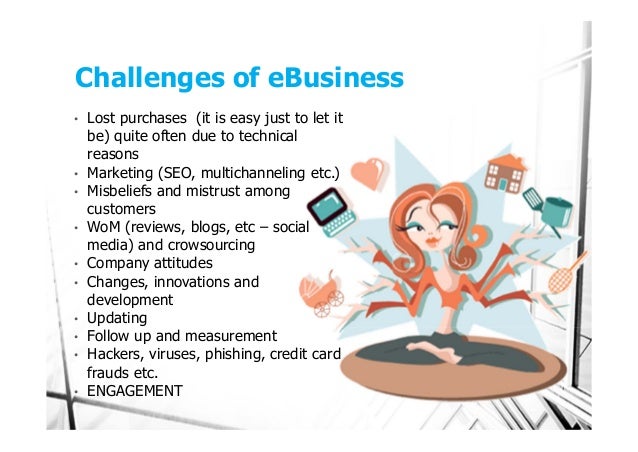
E business challenges include;
Protecting consumers
Leveraging existing systems
Increased liability
Providing security
Adhering to taxation rules


There are numerous advantages and limitations in e business revenue models including;
Transaction fees
License fees
Subscription fees
Value-added fees
Advertising fees


MASHUPS

Web mash up – A Web site or Web application that uses content from more than one source to create a completely new services

Application programming interface (API) – A set of routines, protocols, and tools for building software applications

Mash up editor – WSYIWYGs (What You See Is What You Get) for mash ups 


CHAPTER TWELVE : INTEGRATING THE ORGANIZATION FROM END-TO-END - ENTERPRISE RESOURCE PLANNING

ENTERPRISE RESOURCE PLANNING (ERP)

When a users update information or data in one module, it is immediately and automatically updated throughout the entire system.

ERP systems automates business processes


BRINGING THE ORGANIZATION TOGETHER

ERP - the organization before ERP


Disadvantages
- Update issues
- Redundancy
- Inaccurate information across database
- Different customer information in different databases
- Different formats of information in the different databases


ERP - bringing the organization together


Disadvantages
- Not as flexible and far more difficult to change because of the standardized information
- Might not meet all department needs as well as an individual specific system 
- Multiple access level increases security issues 
- Ethical dilemmas from accessing different department information


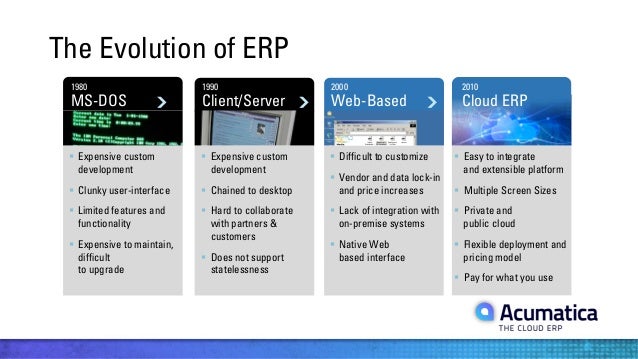
THE EVOLUTION OF ERP


INTEGRATING SCM, CRM, AND ERP


General Audience and Purpose of SCM, ERP, and CRM


INTEGRATING TOOLS

An integrated enterprise infuses support areas, such as finance and human resources, with a strong customer orientation. 

Integration are achieved using:  

Middleware- several different types of software that sit in the middle of and provide connectivity between two or more software applications. It translates information between disparate systems.

Enterprise application integration (EAI) middleware- represents a new approach to middleware by packaging together commonly used functionality, such as providing prbuilt links to popular enterprise applications, which reduces the time necessary to develop solutions that integrate applications from multiple vendors.

Data point where SCM, ERP and CRM integrates.


ENTERPRISE RESOURCE PLANING (ERP)

Flexible- an ERP system should be flexible and quick in order to respond to the changing needs of an enterprise.

Modular and open- an ERP system has to have open system architecture, meaning that any module can be interfaced with or detached whenever required without affecting the other modules. The system should support multiple hardware platforms for organizations that have a heterogeneous collection of systems. It must also support third- party add-on components.

Comprehensive- an ERP system should be able to support a variety of organizational functions and must be suitable for a wide range of business organizations.

Beyond the company- an ERP system must not be confined to organizational boundaries but rather support online connectivity to business partners or customers.


ENTERPRISE RESOURCE PLANNING'S EXPLOSIVE GROWTH

Reasons of ERP being proven to be such a powerful force:

ERP is a logical solution to the mess of incompatible applications that had sprung up in most businesses.

ERP addresses the need for global information sharing and reporting.

ERP is used to avoid the pain and expense of fixing legacy systems


Thursday, September 15, 2016

CHAPTER ELEVEN : BUILDING A CUSTOMER-CENTRIC ORGANIZATION – CUSTOMER RELATIONSHIP MANAGEMENT

CUSTOMER RELATIONSHIP MANAGEMENT (CRM)

CRM enables an organization to;

Provide better customer service
Make call centers more efficient
Cross sell products more effectively
Helps sales staff close deals faster
Simplify marketing and sales processes
Discover new customers
Increase customer revenues

RECENCY, FREQUENCY AND MONETARY VALUE

An organization can find its most valuable customers by using a formula that industry insiders call FRM;
How recently a customer purchased items (recency)
How frequently a customer purchased items (frequency)
How much a customer speeds on each purchased (monetary value)


THE EVALUATION OF CRM

CRM reporting technologies help organizations identify their customers across other applications. CRM analysis technologies help organizations segment their customers into categories such as best and worst customers. CRM predicting technologies help organizations predict customer behavior, such as which customers are at risk of leaving. 


THE UGLY SIDE OF CRM: WHY CRM MATTERS MORE NOW THAN EVER BEFORE


USING ANALYTICAL CRM TO ENHANCE DECISION

Operational CRM – supports traditional transactional processing for day-to-day front-office operations or systems that deal directly with the customers. For example, Sales, Marketing and Customer Service departments.

Analytical CRM – supports back-office operations and strategic analysis and includes all system that do not deal directly with the customers. For example, Financial and Human Resource Department.


CUSTOMER RELATIONSHIP MANAGEMENT SUCCESS FACTORS

CRM success factors include;

Clearly communicate the CRM strategy
Define information needs and flows
Build an integrated view of the customer
Implement in iterations
Scalability for organizational growth


USING ANALYTICAL CRM TO ENHANCE DECISION

Operational CRM and analytical CRM


CHAPTER TEN : ENABLING THE ORGANIZATION - SUPPLY CHAIN MANAGEMENT

BASICS OF SUPPLY CHAIN

SCM – the management of information flows between and among stages in a supply chain to maximize total supply chain effectiveness and profitability

The supply chain has three main links.
1.       Materials flows from suppliers and their upstream suppliers at all levels
2.       Transformation of materials into semi-finished products, or the organization’s own production processes
3.       Distribution of products to customers and their downstream customers at all levels


INFORMATION TECHNOLOGY’S ROLE IN THE SUPPLY CHAIN

 Information technology’s primary role in SCM is creating the integrations or tight process and information linkages between functions within a firm such as marketing, sales, finance, manufacturing, and distribution – and between firms, which allow the smooth, synchronized flow of both information and product between customers, suppliers and transportation providers across the supply chain


VISIBILITY 

Visibility – more visible model of different ways to do things in the supply chain emerged.

·         Supply Chain Visibility is the ability to view all areas up and down the supply chain. Changing supply chains requires a comprehensive strategy buoyed by information technology. Organizations can use technology tools that help them integrate upstream and downstream, with both customers and suppliers.

·         The bullwhip effect occurs when distorted product demand information passes from one entity to the next throughout the supply chain.

CUSTOMER BEHAVIOR

·         The behavior of customers has changed the way businesses complete. Customers will leave if a company does not continually meet their expectations. They are more demanding because they have information readily available, they know exactly what they want, and they know when and how they want it.

·         Demand planning software generates demand forecasts using statistical tools and forecasting techniques. Companies can respond faster and more effectively to consumer demands through supply chain enhancements such as demand planning software.

·         Once an organization understands customer demand and its effect on the supply chain it can begin to estimate the impact that its supply chain will have on its customers and ultimately the organization’s performance.


COMPETITION

·         Supply chain planning (SCP) software uses advanced mathematical algorithms to improve the flow and efficiency of the supply chain while reducing inventory. SCP depends entirely on information for its accuracy.

·         Supply chain execution (SCE) software automates the different steps and stages of the supply chain. This could be as simple as electronically routing orders from a manufacturer to a supplier.


SPEED 

·         These systems raise the accuracy, frequency and speed of communication between suppliers and customers, as well as between internal users.

·         Another aspect of speed is the company’s ability to satisfy continually changing customer requirements efficiently, accurately and quickly.


SUPPLY CHAIN MANAGEMENT SUCCESS FACTORS

·         To succeed in today’s competitive markets, companies must align their supply chain with the demands of the markets they serve.

·         Supply chain performance is now a distinct competitive advantage for companies proficient in the SCM area.


MAKE THE SALE TO SUPPLIERS

The hardest part of any SCM system is its complexity because a large part of the system extends beyond the company’s walls. Not only will the people in the organization need to change the way they work, but also the people from each supplier that is added to the network must change. Be sure suppliers are on board with the benefits that the SCM system will provide.

WEAN EMPLOYEES OFF TRADITIONAL BUSINESS PRACTICES

Operations people typically deal with phone calls, faxes and orders scrawled on paper and will most likely want to keep it that way. Unfortunately, an organization cannot disconnect the telephones and fax machines just because it is implementing a supply chain management system. If the organization cannot convince people that using the software will be worth their time, they will easily find ways to work around it, which will quickly decrease the changes of success for the SCM system.

ENSURE THE SCM SYSTEM SUPPORTS THE ORGANIZATION GOALS

It is important to select SCM software that gives organizations an advantage in the areas most crucial to their business success. If the organizational goals support highly efficient strategies, be sure the supply chain design has the same goals.

DEPLOY IN INCREMENTAL PHASE AND MEASURE AND COMMUNICATE SUCCESS

Design the development of the SCM system in incremental phases. For instance, instead of installing a complete supply chain management system across the company and all suppliers at once, start by getting it working with a few key suppliers, and then move on to the other suppliers. Along the way, make sure each step is adding value through improvements in the supply chain’s performance. While a big-picture perspective is vital to SCM success, the incremental approach means the SCM system should be implemented in digestible bites and also measured for success one step at a time.

BE FUTURE ORIENTED 

The supply chain design must anticipate the future state of the business. Because the SCM system likely will last for many more years than originally planned, managers need to explore how flexible the systems will be when (not if) changes are required in the future. The key is to be certain that the software will meet future needs, not only current needs.